Blog · Nonprofit tax filing
How to file Form 990: a step-by-step guide
June 28, 2026 · By Benjamin Reinke
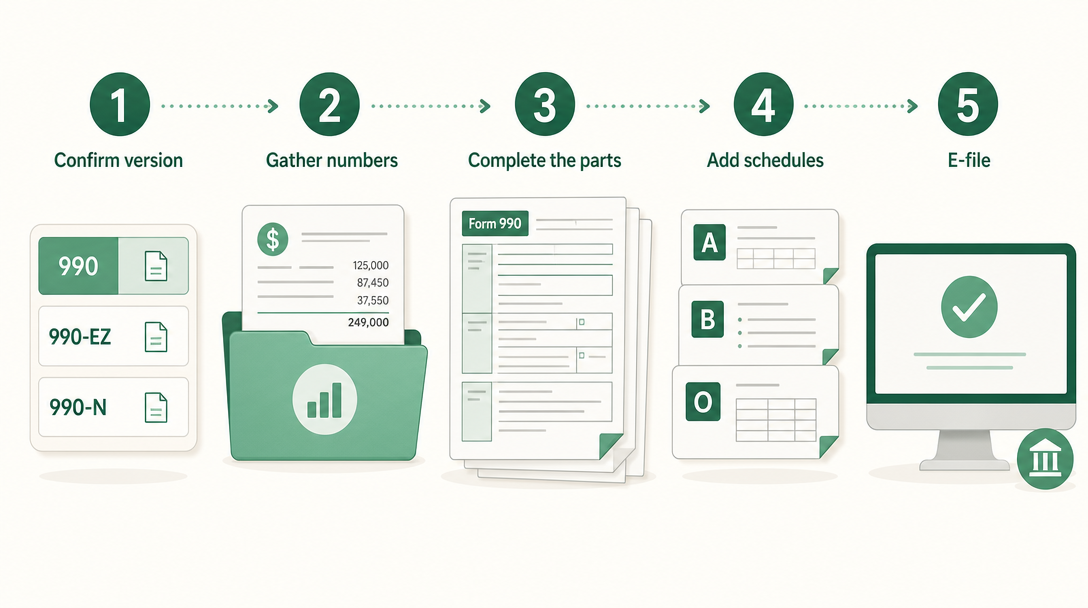
Short answer: Filing Form 990 comes down to four moves — confirm which version you file (990, 990-EZ, or the 990-N e-Postcard), gather the numbers the form asks for (your EIN, gross receipts, total assets, revenue and expenses by category, program accomplishments, and officer pay), complete the core parts and the required schedules, and e-file by the deadline. One rule overrides the rest: the 990 must be filed electronically through an IRS-authorized e-file provider — the IRS no longer accepts a paper Form 990 from most organizations.
The full picture of what the 990 is, who has to file, and how the three versions are sorted by size lives on the main form 990 guide. This page is the practical walkthrough — what you actually do, in order, to get the return out the door.
Step 1 — Confirm which Form 990 you file
Before filling in a single number, settle which return you owe, because the answer changes the entire job ahead of you. The IRS sorts tax-exempt organizations into versions by gross receipts and total assets: an organization with gross receipts normally $50,000 or less files the 990-N (e-Postcard), one with gross receipts under $200,000 and total assets under $500,000 files the Form 990-EZ, and one that crosses either line files the full Form 990. Private foundations file Form 990-PF regardless of size. The thresholds and definitions come straight from the IRS about Form 990 page.
Settling the version first matters because the three forms are different animals. The 990-N is an eight-question electronic notice that takes minutes and needs almost no preparation. The 990-EZ is a four-page short form. The full 990 is a twelve-page core return plus schedules. Confirming your version first tells you how much of the walkthrough below applies — a small church-plant ministry filing the e-Postcard can skip most of it, while a mid-size charity on the EZ or a larger one on the full 990 works through every step.
Step 2 — Gather what the 990 asks for
Pulling your inputs together first saves you from stopping halfway through the form to hunt for a figure. The full 990 and the 990-EZ draw on the same source material, so assemble it once. The essentials:
- Your EIN and basic identity — the organization’s legal name, address, Employer Identification Number, and the tax year the return covers.
- The financial totals — gross receipts for the year and total assets at year-end, the two numbers that confirmed your version in Step 1.
- Revenue by category — contributions and grants, program service revenue, investment income, and any other income, each broken out rather than lumped into one total.
- Expenses by category — every expense sorted into program services, management and general, and fundraising. Books kept by fund and function make this the easiest part of the whole return.
- Program service accomplishments — a plain description of what the organization did during the year and what each major program cost, ready for the narrative section.
- People and pay — a list of officers, directors, trustees, and key employees, with the compensation each received.
- Governance answers — yes/no facts about the board, policies, and oversight: whether the organization has a conflict-of-interest policy, a whistleblower policy, an independent board majority, and how it reviews executive pay.
Having a clean set of church financial statements or nonprofit financials on hand makes this step fast, because most of what the 990 wants is already sitting in your statement of activities and balance sheet.
Step 3 — Complete the core parts of the form
With the inputs ready, work through the body of the return. The full Form 990 is organized into numbered parts, and a handful carry most of the weight. According to the IRS Instructions for Form 990, the parts that do the real reporting are:
- Part I — Summary. A one-page snapshot of the whole return: mission, key totals, and headline figures for revenue, expenses, and net assets. Most filers finish Part I last, after the detail parts are done, since it summarizes them.
- Part III — Statement of Program Service Accomplishments. The narrative heart of the 990, where the organization describes its mission and its largest program services for the year, with the expenses and any revenue tied to each. This is where a reader learns what the organization actually did.
- Part VII — Compensation. Reporting of compensation for officers, directors, trustees, key employees, and the highest-compensated employees. Pay reported here is public, so accuracy matters.
- Part VIII — Statement of Revenue. Every dollar that came in, sorted by source: contributions and grants, program service revenue, investment income, and other revenue.
- Part IX — Statement of Functional Expenses. Every dollar that went out, allocated across three columns — program services, management and general, and fundraising. The program-versus-overhead ratio donors care about is computed straight from this part.
- Part X — Balance Sheet. Assets, liabilities, and net assets at the beginning and end of the year, mirroring the organization’s own balance sheet.
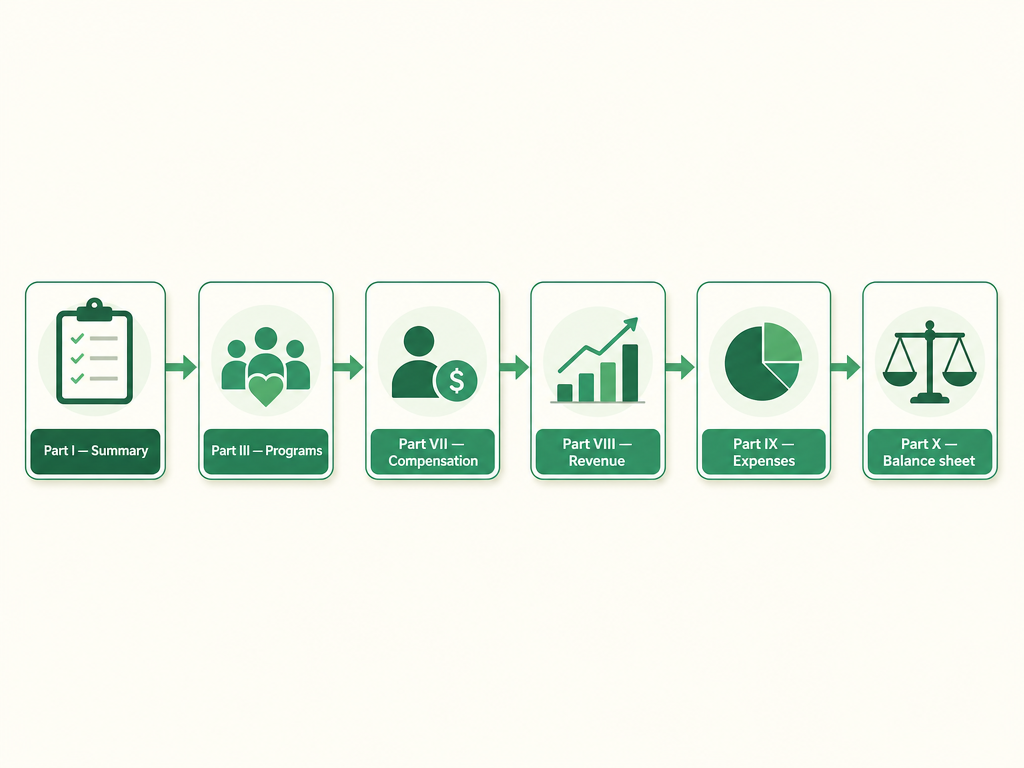
A practical order helps. Many filers complete the detail parts first — revenue (Part VIII), expenses (Part IX), and the balance sheet (Part X) — then the program narrative (Part III) and compensation (Part VII), and only then the Part I summary that pulls the headline numbers together. Working the details before the summary keeps the front page consistent with everything behind it.
Step 4 — Add the required schedules
Beyond the core parts, the 990 attaches schedules that capture detail the main form doesn’t have room for. The IRS lists schedules A through R, but three come up for almost every 501(c)(3):
- Schedule A — Public Charity Status and Public Support. Required for every 501(c)(3) that files the 990 or 990-EZ. Schedule A is where the organization checks the one box explaining why it qualifies as a public charity rather than a private foundation, and where applicable filers run the public support test that confirms enough of their funding comes from the general public.
- Schedule B — Schedule of Contributors. Reports the organization’s larger contributors. Schedule B is generally required when a donor’s giving crosses a reporting threshold, and the rules on which donor details become public depend on the type of organization.
- Schedule O — Supplemental Information. Required of every 990 filer. Schedule O is the catch-all narrative — the place to answer questions that ask for an explanation, to expand a yes/no answer, and to add any detail that didn’t fit in the space the form gave you. The IRS Instructions for Schedule A and the main 990 instructions spell out exactly when each schedule is triggered.
Which other schedules apply depends on what the organization does. A group that runs a school, holds tax-exempt bonds, fundraises through events, or has related organizations will pick up additional schedules — Part IV of the core form is a checklist of yes/no questions, and each “yes” points to the schedule it triggers. Working that checklist tells you precisely which schedules your return needs.
Step 5 — E-file by the deadline
Once the parts and schedules are done, the return gets reviewed, signed by an officer, and filed — and here the most important procedural rule applies. Form 990 must be filed electronically. Under the Taxpayer First Act, for tax years beginning after July 1, 2019, organizations exempt under section 501(a) are required to e-file their annual Form 990, and the 990-EZ joined the electronic mandate for tax years ending July 31, 2021, and later. The IRS confirms on its e-file for charities and nonprofits page that the 990 and 990-EZ are filed electronically through an IRS-authorized e-file provider — a paper Form 990 mailed to the IRS is no longer accepted for most organizations.
The timing rule is just as firm. Form 990 is due on the 15th day of the 5th month after the organization’s fiscal year ends — May 15 for a calendar-year nonprofit. If more time is needed, Form 8868 buys an automatic six-month extension when filed by the original due date. The full set of due dates, fiscal-year math, and the extension mechanics live on the Form 990 deadline and extension guide. Choose an e-file provider, transmit the return, and keep the acknowledgment the system sends back as proof the IRS received it.
Common Form 990 filing mistakes
Several errors show up year after year, and most are avoidable:
- Filing the wrong version. A small charity sitting on a large building can be pushed onto the full 990 by the asset threshold alone, even when its receipts are modest. Re-check both numbers, not just income.
- Skipping required schedules. Forgetting Schedule A or Schedule O is one of the most common reasons a 990 is treated as incomplete, since both are required of nearly every filer. An incomplete return can be sent back as if it were never filed.
- Mismatched totals. When Part I’s summary figures don’t tie to the detail in Parts VIII, IX, and X, the return looks careless to anyone reading it — and the 990 is public.
- Trying to mail paper. Because the 990 must be e-filed, a paper return mailed in is generally not accepted, which can leave an organization treated as a non-filer.
- Letting three years slip. Missing the filing for three consecutive years triggers automatic revocation of tax-exempt status — the single most expensive 990 mistake there is.
FAQ
Do I have to file Form 990 electronically? Yes, for almost every organization. Under the Taxpayer First Act, exempt organizations are required to file Form 990 electronically for tax years beginning after July 1, 2019, and Form 990-EZ for tax years ending July 31, 2021, and later. The return goes through an IRS-authorized e-file provider; a paper Form 990 is no longer accepted from most filers.
What information do I need to file Form 990? Gather your EIN and legal name, gross receipts and total assets, revenue and expenses broken out by category, a description of your program service accomplishments, a list of officers, directors, and key employees with their compensation, and answers to the governance questions. Most of it already lives in your financial statements.
What schedules do I need to attach to Form 990? Schedule O is required of every 990 filer, and Schedule A is required of every 501(c)(3). Schedule B applies when contributions cross a reporting threshold. Other schedules (A through R) are triggered by the yes/no checklist in Part IV — answer it to see which ones your return needs.
When is Form 990 due? Form 990 is due on the 15th day of the 5th month after the organization’s fiscal year ends — May 15 for a calendar-year nonprofit. Filing Form 8868 by that date grants an automatic six-month extension, moving a calendar-year deadline to November 15.
This is general information, not tax or legal advice — confirm your filing requirements with a qualified professional.
Vestrybooks keeps a church’s or nonprofit’s money-in-and-out clean and by-fund all year, so the revenue, functional-expense, and balance-sheet parts of the 990 fall out of your books cleanly instead of being rebuilt at filing time. See how it works
This article is general information for church treasurers, not professional tax or legal advice. For your church's situation, consult a qualified accountant or attorney.
Nonprofit accounting, minus the headache.
Vestrybooks does fund accounting, donor tracking, and board-ready reports for churches and faith-based nonprofits.
A real free plan · no credit card · your data stays yours