Blog · Contributions & statements
How to add online giving to your church website
July 4, 2026 · By Benjamin Reinke
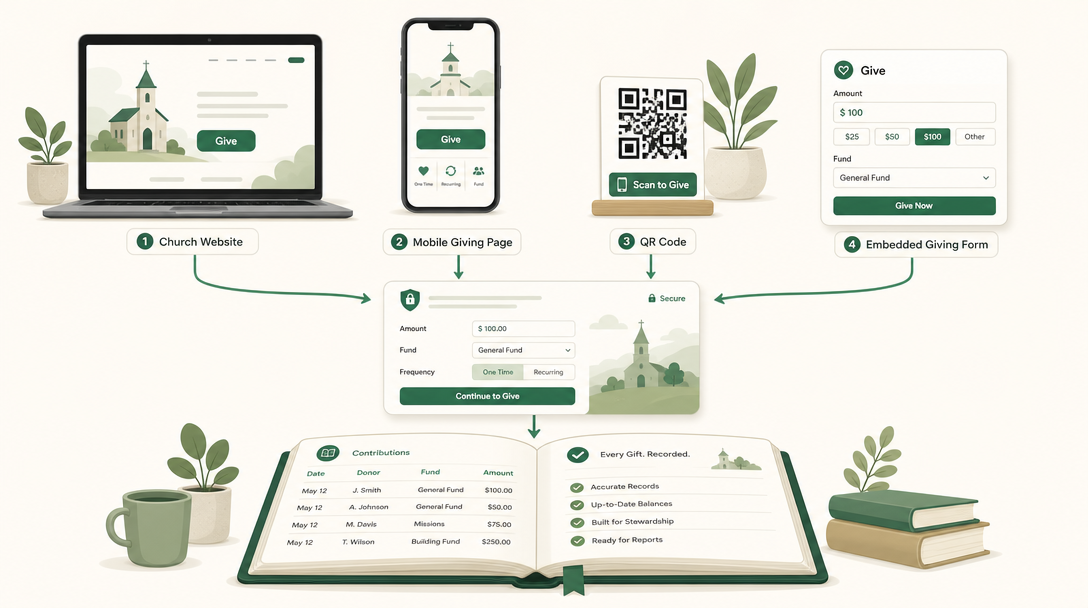
Short answer: The fastest way to add online giving to your church website is to set up a secure giving page with a giving provider, then link to it. Share that page’s link directly (the safest, quickest option — nothing to install), add a “Give” button to your site that points to it, embed the giving form on your page with an <iframe> so members never leave, or print a QR code of the page for the bulletin. Most churches should start by sharing the link and adding a Give button; both work on any site — Wix, Squarespace, WordPress, or a hand-coded page — and neither requires you to be technical.
Below is each method, when to use it, which one most churches should pick, and how to make sure the giving you add actually converts — and posts itself to your books so the treasurer isn’t re-keying gifts by hand.
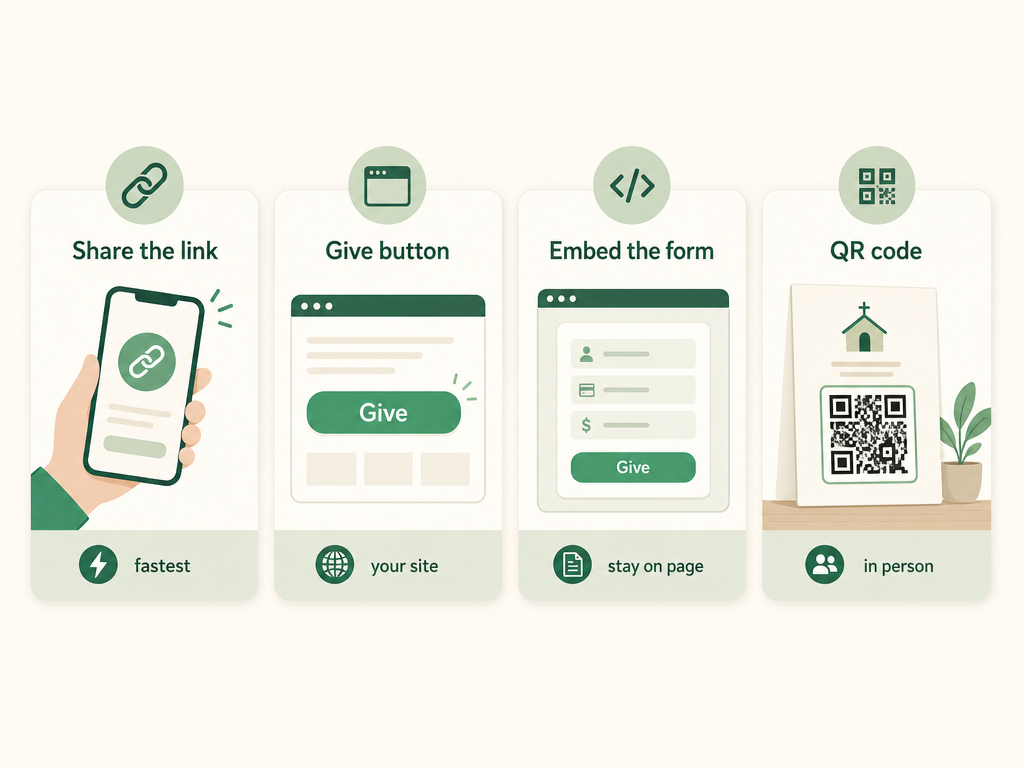
The four ways to add online giving to a church website
A church has four ways to put online giving in front of its members, and they layer on top of each other rather than competing. The foundation of all four is the same: a secure, hosted giving page run by your provider (with Vestrybooks, every church gets one at a web address like app.vestrybooks.com/give/your-church). Once that page exists, adding it to your website is a matter of choosing how members reach it.
Share your giving-page link directly
Sharing the link is the fastest way to start, and for many small churches it’s all you ever need. Your giving page lives at its own secure web address, so you can drop that link into your website’s menu, your email footer, your Facebook page, a pinned post, or a text to the congregation — and members tap through to a page that already handles the payment securely. There’s nothing to install and nothing to break. Because the page is hosted by your provider, the security (the SSL certificate that puts the padlock in the browser and protects card details) lives on their servers, not yours — so even a plain church website with no security setup of its own can collect gifts safely.
Add a “Give” button to your own website
A “Give” button keeps giving on your own site’s navigation, where visitors expect it. With Vestrybooks you copy a ready-made HTML button snippet — already styled in your church’s brand color — and paste it into any page. It renders as a real, tappable button that links straight to your giving page. Most website builders have a place to paste raw HTML (an “embed” or “code” block in Wix, Squarespace, WordPress, and the rest), so this works whether your site is drag-and-drop or hand-built. The button is the standard, expected home for giving: put it in the header or main menu so it’s one tap from every page.
Embed the giving form on your page
Embedding puts the whole giving form directly on your website, so members fill it out without ever leaving your site. Vestrybooks gives you an <iframe> snippet you paste into a page — a “Give” or “Donate” page is the natural home — and the secure form appears inline, framed by your own site’s header and footer. This is the smoothest-feeling option for the visitor, but it asks a little more of your website: your page should load over HTTPS for the embedded form to display cleanly in every browser. If your site doesn’t have that, share the link or use a button instead. When it fits, embedding is the option that makes giving feel like a native part of the church’s own site.
Print a QR code for in-person giving
A QR code turns your giving page into something you can put on paper or a screen. Download the high-resolution QR image of your giving page and drop it into the bulletin, a slide behind the worship set, a pew card, or a sign by the door. A member points their phone camera at it and lands on your giving page in seconds — no typing a web address, no app to download. This is how you reach the people who are physically in the room on a Sunday, which is still where a large share of giving decisions happen. The QR code and a website button aren’t either/or; the same giving page sits behind both.
Which method should most churches pick?
Most churches should start by sharing the giving-page link and adding a Give button, then add a QR code for in-person giving — and reach for the embedded form only if their site supports it. Sharing a direct link to a hosted, secure page is the option that platform providers and giving specialists most commonly recommend as the default, precisely because it’s the safest and simplest: the giving page already carries its own encryption and SSL, so the church’s own website doesn’t have to (a point OnlineGiving.org and similar providers make when they steer churches toward a hosted page rather than a self-hosted form). A button is just a nicer front door to that same link. Embedding is lovely when your site can support it, but it’s the one option with a technical prerequisite, so it shouldn’t be where a non-technical volunteer starts.
The practical order for a small church:
- Set up the giving page and confirm gifts flow to your bank.
- Share the link in your site menu, email, and social — you’re now collecting gifts.
- Add a Give button to your header so it’s one tap from every page.
- Print a QR code for the bulletin and a slide.
- Embed the form later, only if your site loads over HTTPS and you want giving fully on-page.
How to make online giving actually convert
Adding giving is step one; getting members to complete a gift is the real goal, and a few design choices move that number far more than which method you chose. The pattern behind every one of them is the same: remove friction and give people the options they’d choose anyway.
- Make it one tap, and put it everywhere. Giving should be reachable in a single tap from your home page, your menu, and your emails. Every extra click or scroll costs you completed gifts. A visible header button plus a shared link covers this.
- Design for the phone first. Most people who open your church website do it on a phone, so test the whole giving flow on a phone, not just a desktop. The button should be thumb-sized and the form should fit the screen without pinching.
- Offer recurring giving up front. Recurring gifts are the single biggest lever on stable income, because they keep coming through the summer slump and the vacation weeks — the exact times budgets get squeezed. Vestrybooks lets a donor set a gift to repeat weekly, every two weeks, monthly, or yearly right on the giving page, and the data on church giving statistics shows recurring givers give materially more over a year than one-time givers.
- Let donors cover the processing fee. Every online gift, on every platform, pays a card-processing fee (typically around 2.9% + $0.30 per transaction — that’s the card networks’ charge, not the giving platform’s). Giving donors a checkbox to add that small amount so the church receives the full gift is a widely used, well-received option; many donors happily opt in.
- Keep the ask simple. One amount field, a fund or two, a payment method — that’s it. A giving form that asks for a mailing address, a phone number, and a note before it will take a gift bleeds conversions. Ask for the minimum, and let people give in under a minute.
For churches weighing whether a giving page alone is enough or whether they want a fuller engagement toolset, it’s worth being honest: dedicated giving platforms like Tithely, Pushpay, or Subsplash bundle in things Vestrybooks does not, such as a native mobile giving app and text-to-give. What Vestrybooks does instead is take $0 of every gift and post each one straight into the church’s books — a different trade-off, covered next. If you’re comparing options broadly, our overview of church online giving lays out what to look for.
How giving that posts to the books saves the treasurer time
The hidden cost of most online giving is the bookkeeping it creates: gifts land in one system and someone has to copy them, gift by gift, into the church’s records and each donor’s giving history. Online giving that posts to the books removes that step entirely. With Vestrybooks, every online gift records automatically to the right fund and the right donor’s record the moment it comes in — so the money is already accounted for, and the year-end IRS giving statements build themselves.
That’s the quiet payoff of choosing giving that’s connected to your accounting rather than bolted on beside it. A single gift can even be split across several funds — a member can send $80 to the general fund and $20 to missions in one transaction — and each portion lands in the correct fund automatically, with the donor’s record updated for both. When January comes, the treasurer isn’t reconciling a giving export against a spreadsheet; the contribution statements are one click away because every gift was already in the right place. For a fuller look at keeping every gift tied to its giver, see how church donation tracking software handles the record-keeping.
There’s a money angle here too. Because Vestrybooks takes no platform cut, a $100 gift arrives as $100 minus only the unavoidable card-processing fee — the church connects its own Stripe account and receives the rest directly. Over a year of regular giving, keeping that percentage in the ministry instead of a platform’s pocket adds up, which is one reason a fee-free giving page pairs well with the kind of recurring-giving push covered in our guide to church fundraising ideas.
FAQ
How do I add a donate button to my church website? Set up a secure giving page with your provider, then paste a “Give” or “Donate” button that links to it into your site. With Vestrybooks you copy a ready-made HTML button snippet, already styled in your church’s brand color, and paste it into any page — Wix, Squarespace, WordPress, or a custom site all have a place to add raw HTML or an embed block. The button links to your hosted giving page, which handles the payment securely, so you don’t have to add any payment code to your own site.
Can I embed a giving form directly on my church’s page?
Yes. An <iframe> embed places the whole giving form inside one of your pages, so members give without leaving your site. Vestrybooks provides the embed snippet; you paste it into a “Give” page. The one requirement is that your page loads over HTTPS, which most modern website builders do by default. If your site doesn’t, share the giving-page link or use a Give button instead — both reach the same secure page.
Do I need my own SSL certificate to accept gifts online? No, not if you link to or button-link to a hosted giving page. The giving page is served securely by your provider, so its encryption and SSL protect the transaction regardless of your own site’s setup. This is why sharing a direct link is the recommended default for a church whose website has no security of its own. You only need HTTPS on your own site if you want to embed the form directly with an iframe.
How do I make a QR code for church giving? Your giving provider generates it for you. In Vestrybooks you download a high-resolution QR image of your giving page and place it on a bulletin, a slide, a pew card, or a sign. A member scans it with their phone camera and lands on the giving page in seconds — no app and no typing. The QR code points to the same giving page as your website button, so both stay in sync automatically.
Does online giving cost the church a percentage of each gift? Every online gift pays a card-processing fee — typically around 2.9% + $0.30 per transaction — which is charged by the card networks and is unavoidable on any platform. What varies is the platform fee on top of that: many giving tools take an additional 2–5% cut. Vestrybooks takes $0, so the church receives the full gift minus only the card processor’s fee, and donors can optionally cover even that so the church nets 100%.
Vestrybooks gives your church a secure giving page, a branded Give button, an embeddable form, and a QR code — with $0 platform cut, and every gift posting straight to your books and each donor’s record. See how it works.
This article is general information for church treasurers, not professional tax or legal advice. For your church's situation, consult a qualified accountant or attorney.
Track every gift, print statements in one click.
Vestrybooks records each gift by donor and fund, builds IRS-ready year-end statements, and takes $0 of every online gift.
A real free plan · no credit card · your data stays yours